SystemPrompt 整体架构
typescript
  ┌───────────────────────────────────────────────────────┐
  │ System Prompt (多条 message)                           │
  │                                                        │
  │  ┌──────────────────────────────────────────────────┐ │
  │  │ 1. 模型特定 Prompt (静态模板)                     │ │
  │  │    prompt/anthropic.txt / gpt.txt / gemini.txt... │ │
  │  │    → 不是 system prompt,而是 messages 的第一条   │ │
  │  └──────────────────────────────────────────────────┘ │
  │  ┌──────────────────────────────────────────────────┐ │
  │  │ 2. 环境信息 (动态)                               │ │
  │  │    system.ts:environment()                       │ │
  │  │    - 模型 ID、工作目录、Git 状态、OS、日期        │ │
  │  └──────────────────────────────────────────────────┘ │
  │  ┌──────────────────────────────────────────────────┐ │
  │  │ 3. 技能列表 (动态,可选)                         │ │
  │  │    system.ts:skills(agent)                       │ │
  │  │    - Permission 过滤后的 XML 技能清单            │ │
  │  └──────────────────────────────────────────────────┘ │
  │  ┌──────────────────────────────────────────────────┐ │
  │  │ 4. 指令文件 (动态)                               │ │
  │  │    instruction.ts:system()                       │ │
  │  │    - AGENTS.md / CLAUDE.md (就近祖先目录)         │ │
  │  │    - 全局 ~/.config/opencode/AGENTS.md            │ │
  │  │    - 用户配置 config.instructions (路径/URL)      │ │
  │  └──────────────────────────────────────────────────┘ │
  │  ┌──────────────────────────────────────────────────┐ │
  │  │ 5. 条件性注入 (运行时动态)                       │ │
  │  │    - plan.txt (plan mode 时注入)                 │ │
  │  │    - build-switch.txt (plan → build 切换时)       │ │
  │  │    - max-steps.txt (达到最大步数时)               │ │
  │  │    - structured output 提示                       │ │
  │  └──────────────────────────────────────────────────┘ │
  │  ┌──────────────────────────────────────────────────┐ │
  │  │ 6. 历史消息 (动态)                               │ │
  │  │    toModelMessagesEffect(msgs, model)            │ │
  │  │    - 经过 filterCompacted 过滤的历史对话          │ │
  │  │    - 工具输出截断/清除                            │ │
  │  └──────────────────────────────────────────────────┘ │
└───────────────────────────────────────────────────────┘SystemPrompt
typescript
// session/prompt.ts
const [skills, env, instructions, modelMsgs] = yield* Effect.all([
  // skill 列表
  sys.skills(agent),

  // 环境信息
  Effect.sync(() => sys.environment(model)),

  // 指令(Agent.md 等)
  instruction.system().pipe(Effect.orDie),

  // 历史消息
  MessageV2.toModelMessagesEffect(msgs, model),
])

// 构建 system-prompt
// system = [环境信息, ...(技能列表 ? [技能列表] : []), ...指令列表]
const system = [...env, ...(skills ? [skills] : []), ...instructions]

// 附加:
// 结构化输出提示 (如果 format.type === "json_schema")
// MAX_STEPS 提示 (如果是最后一步)

// 结构化输出提示
const format = lastUser.format ?? { type: "text" as const }
if (format.type === "json_schema") system.push(STRUCTURED_OUTPUT_SYSTEM_PROMPT)

// MAX_STEPS 提示
messages: [...modelMsgs, ...(isLastStep ? [{ role: "assistant" as const, content: MAX_STEPS }] : [])],静态模板
根据不同的厂商选择不同的 prompt
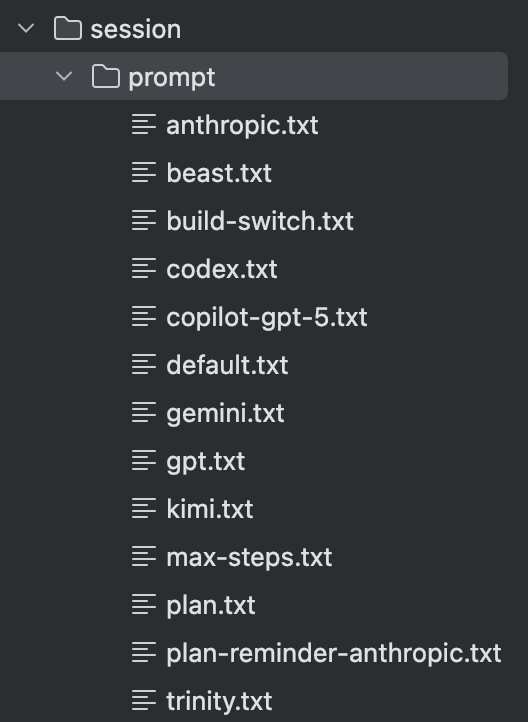
这些模板内容是给 Agent 的身份 + 行为准则:你是谁、怎么使用工具、代码风格、语气风格等。
这些不是 system prompt,而是作为 messages 的第一条(历史消息的一部分)输入给模型。
typescript
// session/prompt.ts
import PROMPT_ANTHROPIC from "./prompt/anthropic.txt"
import PROMPT_DEFAULT from "./prompt/default.txt"
import PROMPT_BEAST from "./prompt/beast.txt"
import PROMPT_GEMINI from "./prompt/gemini.txt"
import PROMPT_GPT from "./prompt/gpt.txt"
import PROMPT_KIMI from "./prompt/kimi.txt"
import PROMPT_CODEX from "./prompt/codex.txt"
import PROMPT_TRINITY from "./prompt/trinity.txt"

import type { Provider } from "@/provider/provider"
import type { Agent } from "@/agent/agent"
import { Permission } from "@/permission"
import { Skill } from "@/skill"

export function provider(model: Provider.Model) {
  if (model.api.id.includes("gpt-4") || model.api.id.includes("o1") || model.api.id.includes("o3"))
    return [PROMPT_BEAST]
  if (model.api.id.includes("gpt")) {
    if (model.api.id.includes("codex")) {
      return [PROMPT_CODEX]
    }
    return [PROMPT_GPT]
  }
  if (model.api.id.includes("gemini-")) return [PROMPT_GEMINI]
  if (model.api.id.includes("claude")) return [PROMPT_ANTHROPIC]
  if (model.api.id.toLowerCase().includes("trinity")) return [PROMPT_TRINITY]
  if (model.api.id.toLowerCase().includes("kimi")) return [PROMPT_KIMI]
  return [PROMPT_DEFAULT]
}环境信息
让模型知道自己在哪、有什么能力。
typescript
// session/prompt.ts
environment(model) {
  const project = Instance.project
  return [
    [
      `You are powered by the model named ${model.api.id}. The exact model ID is ${model.providerID}/${model.api.id}`,
      `Here is some useful information about the environment you are running in:`,
      `<env>`,
      `  Working directory: ${Instance.directory}`,
      `  Workspace root folder: ${Instance.worktree}`,
      `  Is directory a git repo: ${project.vcs === "git" ? "yes" : "no"}`,
      `  Platform: ${process.platform}`,
      `  Today's date: ${new Date().toDateString()}`,
      `</env>`,
    ].join("\n"),
  ]
}技能列表
typescript
skills: Effect.fn("SystemPrompt.skills")(function* (agent: Agent.Info) {
  if (Permission.disabled(["skill"], agent.permission).has("skill")) return

  const list = yield* skill.available(agent)

  return [
    "Skills provide specialized instructions and workflows for specific tasks.",
    "Use the skill tool to load a skill when a task matches its description.",
    // the agents seem to ingest the information about skills a bit better if we present a more verbose
    // version of them here and a less verbose version in tool description, rather than vice versa.

    // 返回 xml 格式的 skill
    Skill.fmt(list, { verbose: true }),
  ].join("\n")
})指令文件
typescript
第 4 层:指令文件 (instruction.ts)

  这是最复杂的部分,有 4 个来源:

  优先级 (就近覆盖):
    1. 项目级 AGENTS.md/CLAUDE.md (从工作目录向上找,第一个匹配胜出)
    2. 全局 ~/.config/opencode/AGENTS.md
    3. config.instructions 中的文件路径 (支持 glob)
    4. config.instructions 中的远程 URL (HTTP GET, 5s 超时)

  读取方式:所有文件并发读取(concurrency=8),所有 URL 并发获取(concurrency=4),结果格式化为 "Instructions from:
  ${path}\n${content}"。

还有一个 instruction.resolve() 在 Read 工具读取文件时触发,自动注入读取文件所在目录附近的 AGENTS.md(防止缺少上下文)。条件性注入
typescript
第 5 层:条件性注入 (insertReminders)

  在 prompt.ts:268-330,根据 Agent 切换状态动态注入 synthetic text parts(合成文本,不持久化到数据库):

  Plan Agent 启动 → 注入 plan.txt (只读模式提醒)
  Plan → Build 切换 → 注入 build-switch.txt + plan 文件路径
  最后一步 → 注入 max-steps.txt (禁止工具调用)
  json_schema format → 注入结构化输出提示

这些是作为用户消息的 part 注入的,不是 system prompt。typescript
// 插入 reminder
const insertReminders = Effect.fn("SessionPrompt.insertReminders")(function* (input: {
  messages: MessageV2.WithParts[]
  agent: Agent.Info
  session: Session.Info
}) {
  const userMessage = input.messages.findLast((msg) => msg.info.role === "user")
  if (!userMessage) return input.messages

  if (!Flag.OPENCODE_EXPERIMENTAL_PLAN_MODE) {
    // plan 提醒模式
    if (input.agent.name === "plan") {
      userMessage.parts.push({
        id: PartID.ascending(),
        messageID: userMessage.info.id,
        sessionID: userMessage.info.sessionID,
        type: "text",
        text: PROMPT_PLAN,
        synthetic: true,
      })
    }
    const wasPlan = input.messages.some((msg) => msg.info.role === "assistant" && msg.info.agent === "plan")
    // build 提醒模式
    if (wasPlan && input.agent.name === "build") {
      userMessage.parts.push({
        id: PartID.ascending(),
        messageID: userMessage.info.id,
        sessionID: userMessage.info.sessionID,
        type: "text",
        text: BUILD_SWITCH,
        synthetic: true,
      })
    }
    return input.messages
  }

  // Plan 模式完整系统提醒
  const assistantMessage = input.messages.findLast((msg) => msg.info.role === "assistant")
  if (input.agent.name !== "plan" && assistantMessage?.info.agent === "plan") {
    const plan = Session.plan(input.session)
    if (!(yield * fsys.existsSafe(plan))) return input.messages
    const part =
      yield *
      sessions.updatePart({
        id: PartID.ascending(),
        messageID: userMessage.info.id,
        sessionID: userMessage.info.sessionID,
        type: "text",
        text: `${BUILD_SWITCH}\n\nA plan file exists at ${plan}. You should execute on the plan defined within it`,
        synthetic: true,
      })
    userMessage.parts.push(part)
    return input.messages
  }

  if (input.agent.name !== "plan" || assistantMessage?.info.agent === "plan") return input.messages

  const plan = Session.plan(input.session)
  const exists = yield * fsys.existsSafe(plan)
  if (!exists) yield * fsys.ensureDir(path.dirname(plan)).pipe(Effect.catch(Effect.die))
  const part =
    yield *
    sessions.updatePart({
      id: PartID.ascending(),
      messageID: userMessage.info.id,
      sessionID: userMessage.info.sessionID,
      type: "text",
      text: `<system-reminder>
Plan mode is active. The user indicated that they do not want you to execute yet -- you MUST NOT make any edits (with the exception of the plan file mentioned below), run any non-readonly tools (including changing configs or making commits), or otherwise make any changes to the system. This supersedes any other instructions you have received.

## Plan File Info:
${exists ? `A plan file already exists at ${plan}. You can read it and make incremental edits using the edit tool.` : `No plan file exists yet. You should create your plan at ${plan} using the write tool.`}
You should build your plan incrementally by writing to or editing this file. NOTE that this is the only file you are allowed to edit - other than this you are only allowed to take READ-ONLY actions.

## Plan Workflow

### Phase 1: Initial Understanding
Goal: Gain a comprehensive understanding of the user's request by reading through code and asking them questions. Critical: In this phase you should only use the explore subagent type.

1. Focus on understanding the user's request and the code associated with their request

2. **Launch up to 3 explore agents IN PARALLEL** (single message, multiple tool calls) to efficiently explore the codebase.
 - Use 1 agent when the task is isolated to known files, the user provided specific file paths, or you're making a small targeted change.
 - Use multiple agents when: the scope is uncertain, multiple areas of the codebase are involved, or you need to understand existing patterns before planning.
 - Quality over quantity - 3 agents maximum, but you should try to use the minimum number of agents necessary (usually just 1)
 - If using multiple agents: Provide each agent with a specific search focus or area to explore. Example: One agent searches for existing implementations, another explores related components, a third investigates testing patterns

3. After exploring the code, use the question tool to clarify ambiguities in the user request up front.

### Phase 2: Design
Goal: Design an implementation approach.

Launch general agent(s) to design the implementation based on the user's intent and your exploration results from Phase 1.

You can launch up to 1 agent(s) in parallel.

**Guidelines:**
- **Default**: Launch at least 1 Plan agent for most tasks - it helps validate your understanding and consider alternatives
- **Skip agents**: Only for truly trivial tasks (typo fixes, single-line changes, simple renames)

Examples of when to use multiple agents:
- The task touches multiple parts of the codebase
- It's a large refactor or architectural change
- There are many edge cases to consider
- You'd benefit from exploring different approaches

Example perspectives by task type:
- New feature: simplicity vs performance vs maintainability
- Bug fix: root cause vs workaround vs prevention
- Refactoring: minimal change vs clean architecture

In the agent prompt:
- Provide comprehensive background context from Phase 1 exploration including filenames and code path traces
- Describe requirements and constraints
- Request a detailed implementation plan

### Phase 3: Review
Goal: Review the plan(s) from Phase 2 and ensure alignment with the user's intentions.
1. Read the critical files identified by agents to deepen your understanding
2. Ensure that the plans align with the user's original request
3. Use question tool to clarify any remaining questions with the user

### Phase 4: Final Plan
Goal: Write your final plan to the plan file (the only file you can edit).
- Include only your recommended approach, not all alternatives
- Ensure that the plan file is concise enough to scan quickly, but detailed enough to execute effectively
- Include the paths of critical files to be modified
- Include a verification section describing how to test the changes end-to-end (run the code, use MCP tools, run tests)

### Phase 5: Call plan_exit tool
At the very end of your turn, once you have asked the user questions and are happy with your final plan file - you should always call plan_exit to indicate to the user that you are done planning.
This is critical - your turn should only end with either asking the user a question or calling plan_exit. Do not stop unless it's for these 2 reasons.

**Important:** Use question tool to clarify requirements/approach, use plan_exit to request plan approval. Do NOT use question tool to ask "Is this plan okay?" - that's what plan_exit does.

NOTE: At any point in time through this workflow you should feel free to ask the user questions or clarifications. Don't make large assumptions about user intent. The goal is to present a well researched plan to the user, and tie any loose ends before implementation begins.
</system-reminder>`,
      synthetic: true,
    })
  userMessage.parts.push(part)
  return input.messages
})历史消息
typescript
  第 6 层:历史消息

  调用 MessageV2.toModelMessagesEffect(msgs, model) 将内部消息格式转换为 Vercel AI SDK 的 ModelMessage[],期间自动处理:
  - filterCompacted 过滤已压缩的旧消息
  - 工具输出截断(2000 字符)
  - 已裁剪工具输出替换为 "[Old tool result content cleared]"
- 媒体剥离(图片/PDF)typescript
export const toModelMessagesEffect = Effect.fnUntraced(function* (
  input: WithParts[],
  model: Provider.Model,
  options?: { stripMedia?: boolean; toolOutputMaxChars?: number },
) {
  const result: UIMessage[] = []
  const toolNames = new Set<string>()
  // Track media from tool results that need to be injected as user messages
  // for providers that don't support media in tool results.
  //
  // OpenAI-compatible APIs only support string content in tool results, so we need
  // to extract media and inject as user messages. Other SDKs (anthropic, google,
  // bedrock) handle type: "content" with media parts natively.
  //
  // Only apply this workaround if the model actually supports image input -
  // otherwise there's no point extracting images.
  const supportsMediaInToolResults = (() => {
    if (model.api.npm === "@ai-sdk/anthropic") return true
    if (model.api.npm === "@ai-sdk/openai") return true
    if (model.api.npm === "@ai-sdk/amazon-bedrock") return true
    if (model.api.npm === "@ai-sdk/google-vertex/anthropic") return true
    if (model.api.npm === "@ai-sdk/google") {
      const id = model.api.id.toLowerCase()
      return id.includes("gemini-3") && !id.includes("gemini-2")
    }
    return false
  })()

  const toModelOutput = (options: { toolCallId: string; input: unknown; output: unknown }) => {
    const output = options.output
    if (typeof output === "string") {
      return { type: "text", value: output }
    }

    if (typeof output === "object") {
      const outputObject = output as {
        text: string
        attachments?: Array<{ mime: string; url: string }>
      }
      const attachments = (outputObject.attachments ?? []).filter((attachment) => {
        return attachment.url.startsWith("data:") && attachment.url.includes(",")
      })

      return {
        type: "content",
        value: [
          { type: "text", text: outputObject.text },
          ...attachments.map((attachment) => ({
            type: "media",
            mediaType: attachment.mime,
            data: iife(() => {
              const commaIndex = attachment.url.indexOf(",")
              return commaIndex === -1 ? attachment.url : attachment.url.slice(commaIndex + 1)
            }),
          })),
        ],
      }
    }

    return { type: "json", value: output as never }
  }

  for (const msg of input) {
    if (msg.parts.length === 0) continue

    // 处理 user message
    if (msg.info.role === "user") {
      const userMessage: UIMessage = {
        id: msg.info.id,
        role: "user",
        parts: [],
      }
      result.push(userMessage)
      for (const part of msg.parts) {
        if (part.type === "text" && !part.ignored)
          userMessage.parts.push({
            type: "text",
            text: part.text,
          })
        // text/plain and directory files are converted into text parts, ignore them
        if (part.type === "file" && part.mime !== "text/plain" && part.mime !== "application/x-directory") {
          if (options?.stripMedia && isMedia(part.mime)) {
            userMessage.parts.push({
              type: "text",
              text: `[Attached ${part.mime}: ${part.filename ?? "file"}]`,
            })
          } else {
            userMessage.parts.push({
              type: "file",
              url: part.url,
              mediaType: part.mime,
              filename: part.filename,
            })
          }
        }

        if (part.type === "compaction") {
          userMessage.parts.push({
            type: "text",
            text: "What did we do so far?",
          })
        }
        if (part.type === "subtask") {
          userMessage.parts.push({
            type: "text",
            text: "The following tool was executed by the user",
          })
        }
      }
    }

    // 处理 ai message
    if (msg.info.role === "assistant") {
      const differentModel = `${model.providerID}/${model.id}` !== `${msg.info.providerID}/${msg.info.modelID}`
      const media: Array<{ mime: string; url: string }> = []

      if (
        msg.info.error &&
        !(
          AbortedError.isInstance(msg.info.error) &&
          msg.parts.some((part) => part.type !== "step-start" && part.type !== "reasoning")
        )
      ) {
        continue
      }
      const assistantMessage: UIMessage = {
        id: msg.info.id,
        role: "assistant",
        parts: [],
      }
      for (const part of msg.parts) {
        if (part.type === "text")
          assistantMessage.parts.push({
            type: "text",
            text: part.text,
            ...(differentModel ? {} : { providerMetadata: part.metadata }),
          })
        if (part.type === "step-start")
          assistantMessage.parts.push({
            type: "step-start",
          })
        if (part.type === "tool") {
          toolNames.add(part.tool)
          if (part.state.status === "completed") {
            const outputText = part.state.time.compacted
              ? "[Old tool result content cleared]"
              : truncateToolOutput(part.state.output, options?.toolOutputMaxChars)
            const attachments = part.state.time.compacted || options?.stripMedia ? [] : (part.state.attachments ?? [])

            // For providers that don't support media in tool results, extract media files
            // (images, PDFs) to be sent as a separate user message
            const mediaAttachments = attachments.filter((a) => isMedia(a.mime))
            const nonMediaAttachments = attachments.filter((a) => !isMedia(a.mime))
            if (!supportsMediaInToolResults && mediaAttachments.length > 0) {
              media.push(...mediaAttachments)
            }
            const finalAttachments = supportsMediaInToolResults ? attachments : nonMediaAttachments

            const output =
              finalAttachments.length > 0
                ? {
                    text: outputText,
                    attachments: finalAttachments,
                  }
                : outputText

            assistantMessage.parts.push({
              type: ("tool-" + part.tool) as `tool-${string}`,
              state: "output-available",
              toolCallId: part.callID,
              input: part.state.input,
              output,
              ...(part.metadata?.providerExecuted ? { providerExecuted: true } : {}),
              ...(differentModel ? {} : { callProviderMetadata: providerMeta(part.metadata) }),
            })
          }
          if (part.state.status === "error") {
            const output = part.state.metadata?.interrupted === true ? part.state.metadata.output : undefined
            if (typeof output === "string") {
              assistantMessage.parts.push({
                type: ("tool-" + part.tool) as `tool-${string}`,
                state: "output-available",
                toolCallId: part.callID,
                input: part.state.input,
                output,
                ...(part.metadata?.providerExecuted ? { providerExecuted: true } : {}),
                ...(differentModel ? {} : { callProviderMetadata: providerMeta(part.metadata) }),
              })
            } else {
              assistantMessage.parts.push({
                type: ("tool-" + part.tool) as `tool-${string}`,
                state: "output-error",
                toolCallId: part.callID,
                input: part.state.input,
                errorText: part.state.error,
                ...(part.metadata?.providerExecuted ? { providerExecuted: true } : {}),
                ...(differentModel ? {} : { callProviderMetadata: providerMeta(part.metadata) }),
              })
            }
          }
          // Handle pending/running tool calls to prevent dangling tool_use blocks
          // Anthropic/Claude APIs require every tool_use to have a corresponding tool_result
          if (part.state.status === "pending" || part.state.status === "running")
            assistantMessage.parts.push({
              type: ("tool-" + part.tool) as `tool-${string}`,
              state: "output-error",
              toolCallId: part.callID,
              input: part.state.input,
              errorText: "[Tool execution was interrupted]",
              ...(part.metadata?.providerExecuted ? { providerExecuted: true } : {}),
              ...(differentModel ? {} : { callProviderMetadata: providerMeta(part.metadata) }),
            })
        }
        if (part.type === "reasoning") {
          assistantMessage.parts.push({
            type: "reasoning",
            text: part.text,
            ...(differentModel ? {} : { providerMetadata: part.metadata }),
          })
        }
      }
      if (assistantMessage.parts.length > 0) {
        result.push(assistantMessage)
        // Inject pending media as a user message for providers that don't support
        // media (images, PDFs) in tool results
        if (media.length > 0) {
          result.push({
            id: MessageID.ascending(),
            role: "user",
            parts: [
              {
                type: "text" as const,
                text: SYNTHETIC_ATTACHMENT_PROMPT,
              },
              ...media.map((attachment) => ({
                type: "file" as const,
                url: attachment.url,
                mediaType: attachment.mime,
              })),
            ],
          })
        }
      }
    }
  }

  const tools = Object.fromEntries(Array.from(toolNames).map((toolName) => [toolName, { toModelOutput }]))

  return (
    yield *
    Effect.promise(() =>
      // 转换为 Vercel AI SDK 的 ModelMessage 格式
      convertToModelMessages(
        result.filter((msg) => msg.parts.some((part) => part.type !== "step-start")),
        {
          //@ts-expect-error (convertToModelMessages expects a ToolSet but only actually needs tools[name]?.toModelOutput)
          tools,
        },
      ),
    )
  )
})运行时 Prompt 构建流程
typescript
prompt():
  1. createUserMessage() — 解析用户输入,创建 User Message + Parts
     ├─ 解析 @file 引用 → FilePart
     ├─ 解析 @agent 引用 → AgentPart
     ├─ 解析 MCP 资源 → TextPart + FilePart
     └─ 纯文本 → TextPart

  2. touch(sessionID) — 更新时间戳

  3. loop(sessionID) — 进入主循环
     ├─ filterCompactedEffect() — 过滤历史
     ├─ insertReminders() — 注入条件提示 (plan/build)
     ├─ resolveTools() — 解析可用工具
     ├─ SystemPrompt.skills() — 技能列表
     ├─ SystemPrompt.environment() — 环境信息
     ├─ Instruction.system() — 指令文件内容
     ├─ toModelMessagesEffect() — 历史消息转换
└─ processor.process({ system, messages, tools, ... }) → LLM小结
OpenCode 的 prompt 设计是模块化的、非硬编码的:
- 静态模板:模型特定的身份定义(.txt 文件)
- 环境信息:运行时动态注入(工作目录、Git、OS)
- 技能列表:基于 Permission 动态过滤
- 指令文件:多源聚合(项目级 → 全局 → 配置 → 远程)
- 条件注入:根据 Agent 模式(plan/build)动态追加
- 历史消息:自动过滤 + 截断 + 压缩
所有层最终以 string[] 的形式传入 LLM SDK 的 system 参数,每条 system message 独立保留。