什么是 Skill
一个 Skill 本质上是一个带元数据的 Markdown 文件。当用户或 AI 调用它时,Markdown 内容会被作为 Prompt 注入到对话中。
plain
.claude/skills/
└── commit/
└── SKILL.md ← 这就是一个 Skill一个 skill 文件内容:
plain
---
name: commit
description: 提交代码变更
---

检查当前 git 状态,生成有意义的 commit message,然后提交。

步骤:
1. 运行 git status 查看变更
2. 运行 git diff 理解变更内容
3. 生成简洁的 commit message
4. 执行 git commit- Frontmatter:name(唯一标识符)+ description(简短描述,用于匹配任务)
- Content:完整的技能指令正文,包含工作流指导、脚本引用、参考文档路径等
Skill 的定义
typescript
export const Info = Schema.Struct({
  // skill 名称
  name: Schema.String,

  // skill 描述
  description: Schema.String,

  // skill 的文件路径
  location: Schema.String,

  // skill 具体内容
  content: Schema.String,
}).pipe(withStatics((s) => ({ zod: zod(s) })))

export type Info = Schema.Schema.Type<typeof Info>Skill 来源
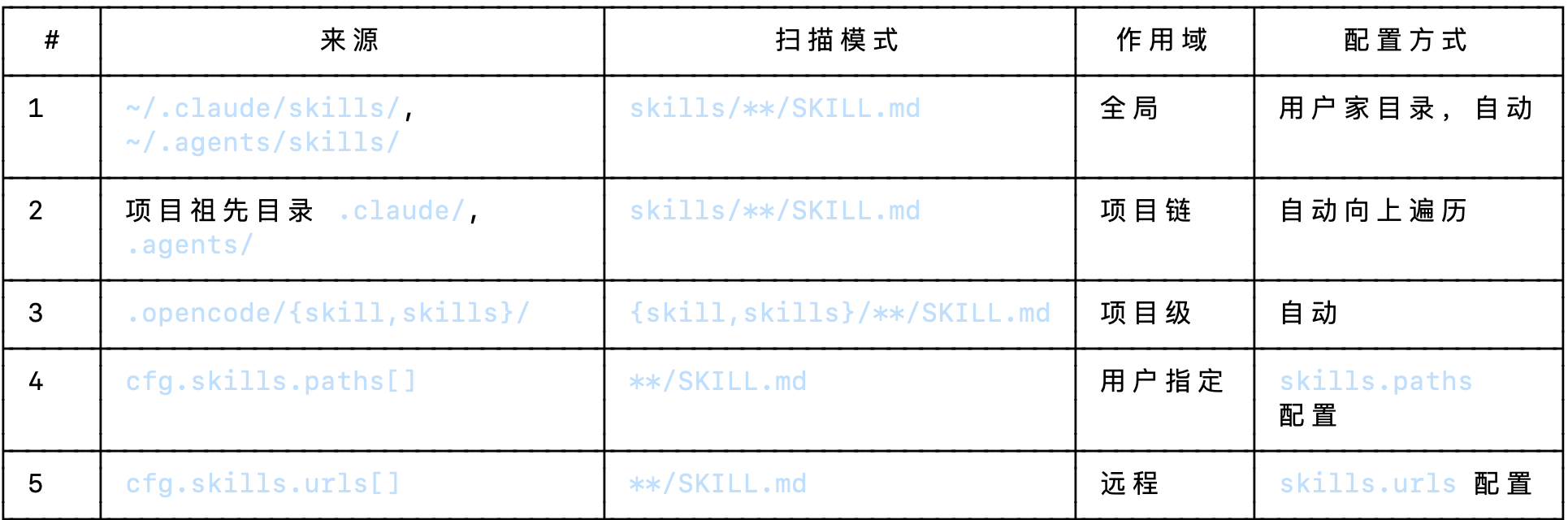
所有来源最终汇入 ScanState(去重 Set),然后通过 loadSkills() 解析为 Record<string, Info>。
发现 Skill
discoverSkill
扫描的路径:
typescript
const EXTERNAL_DIRS = [".claude", ".agents"]                 // 外部 skill 目录名
const EXTERNAL_SKILL_PATTERN = "skills/**/SKILL.md"           // 外部 skill 的 glob
const OPENCODE_SKILL_PATTERN = "{skill,skills}/**/SKILL.md"   // opencode 配置目录的 glob
const SKILL_PATTERN = "**/SKILL.md"                           // 用户自定义路径的 glob(更宽松)

注意区别:
  - 外部 skill:必须是 skills/ 子目录下的 SKILL.md
  - OpenCode 配置:可以是 skill/ 或 skills/,兼容两种命名
- 用户自定义路径:任何深度的 **/SKILL.md,最宽松具体的扫描:
typescript
const scan = Effect.fnUntraced(function* (
  state: ScanState,
  root: string,
  pattern: string,
  opts?: { dot?: boolean; scope?: string },
) {
  const matches = yield* Effect.tryPromise({
    try: () =>
      Glob.scan(pattern, {
        cwd: root,        // 扫描根目录
        absolute: true,   // 返回绝对路径
        include: "file",  // 只返回文件,不返回目录
        symlink: true,    // 跟随符号链接
        dot: opts?.dot,   // 是否扫描隐藏目录(外部 skill 需要)
      }),
    catch: (error) => error,
  }).pipe(
    Effect.catch((error) => {
      if (!opts?.scope) return Effect.die(error)   // 没有 scope → 致命错误
      log.error(`failed to scan ${opts.scope} skills`, { dir: root, error })
      return Effect.succeed([] as string[])          // 有 scope → 容错,返回空数组
    }),
  )

  // 将结果写入共享的 mutable state
  for (const match of matches) {
    state.matches.add(match)            // SKILL.md 的路径 【Set 自动去重】
    state.dirs.add(path.dirname(match)) // SKILL.md 所在的文件夹
  }
})Glob.scan()底层是npm **glob**包的 Promise 封装(packages/core/src/util/glob.ts),本质就是glob(pattern, options)。
discoverSkills 发现 skill【扫描不同路径下的 skill】:
typescript
const discoverSkills = Effect.fnUntraced(function* (
  config, discovery, fsys, directory, worktree
) {
  const state: ScanState = { matches: new Set(), dirs: new Set() }

  // === 来源 1:全局 ~/.claude/ 和 ~/.agents/ ===
  for (const dir of EXTERNAL_DIRS) {
    const root = path.join(Global.Path.home, dir)
    if (!(yield* fsys.isDir(root))) continue     // 目录不存在就跳过
    yield* scan(state, root, EXTERNAL_SKILL_PATTERN, { dot: true, scope: "global" })
  }

  // === 来源 2:向上遍历项目祖先目录 ===
  const upDirs = yield* fsys.up({
    targets: EXTERNAL_DIRS,  // ["\.claude", "\.agents"]
    start: directory,         // 项目根目录
    stop: worktree            // worktree 边界,不越界
  })
  for (const root of upDirs) {
    yield* scan(state, root, EXTERNAL_SKILL_PATTERN, { dot: true, scope: "project" })
  }

  // === 来源 3:opencode 配置目录 ===
  const configDirs = yield* config.directories()
  for (const dir of configDirs) {
    yield* scan(state, dir, OPENCODE_SKILL_PATTERN)
  }

  // === 来源 4:用户显式路径 ===
  const cfg = yield* config.get()
  for (const item of cfg.skills?.paths ?? []) {
    const expanded = item.startsWith("~/")
      ? path.join(os.homedir(), item.slice(2))
      : item
    const dir = path.isAbsolute(expanded)
      ? expanded
      : path.join(directory, expanded)
    if (!(yield* fsys.isDir(dir))) {
      log.warn("skill path not found", { path: dir })
      continue
    }
    yield* scan(state, dir, SKILL_PATTERN)
  }

  // === 来源 5:远程 URL ===
  for (const url of cfg.skills?.urls ?? []) {
    const pulledDirs = yield* discovery.pull(url)
    for (const dir of pulledDirs) {
      yield* scan(state, dir, SKILL_PATTERN)
    }
  }

  // 返回 InstanceState ,Skill 原始数据
  return { matches: Array.from(state.matches), dirs: Array.from(state.dirs) }
})loadSkill
add: 解析单个 SKILL.md
typescript
const add = Effect.fnUntraced(function* (state: State, match: string, bus: Bus.Interface) {
  // 1. 解析 Markdown + YAML frontmatter
  const md = yield* Effect.tryPromise({
    try: () => ConfigMarkdown.parse(match),   // 异步读文件 + gray-matter 解析
    catch: (err) => err,
  }).pipe(
    Effect.catch(function* (err) {
      // 解析失败不 crash,通过 Bus 广播错误事件到 TUI
      const { Session } = yield* Effect.promise(() => import("@/session/session"))
      yield* bus.publish(Session.Event.Error, { error: ... })
      log.error("failed to load skill", { skill: match, err })
      return undefined
    }),
  )

  if (!md) return  // 解析失败,跳过

  // 2. Zod 校验 frontmatter 必须字段
  const parsed = z.object({ name: z.string(), description: z.string() }).safeParse(md.data)
  if (!parsed.success) return  // 缺少 name 或 description,跳过

  // 3. 重复检测
  if (state.skills[parsed.data.name]) {
    log.warn("duplicate skill name", {
      name: parsed.data.name,
      existing: state.skills[parsed.data.name].location,
      duplicate: match,
    })
  }

  // InstanceState 第二层缓存,缓存解析完毕的 SKILL
  // 4. 写入 state(同名 skill 最后写入的覆盖前面的)
  state.dirs.add(path.dirname(match))
  state.skills[parsed.data.name] = {
    name: parsed.data.name,
    description: parsed.data.description,
    location: match,        // SKILL.md 的绝对路径
    content: md.content,    // Markdown 正文(不含 frontmatter)
  }
})loadSkills:concurrency: "unbounded"— 所有 SKILL.md 文件并发解析,不限制并行度。
typescript
const loadSkills = Effect.fnUntraced(function* (state, discovered, bus) {
  yield* Effect.forEach(discovered.matches,
                        (match) => add(state, match, bus),
                        {
                          concurrency: "unbounded",  // 无限制并发,充分利用 IO
                          discard: true,             // 不收集返回值,只关心副作用
                        })
  log.info("init", { count: Object.keys(state.skills).length })
})InstanceState 缓存
两层 InstanceState 缓存
typescript
// 第一层:发现结果缓存
const discovered = yield* InstanceState.make(
  Effect.fn("Skill.discovery")((ctx) =>
    discoverSkills(config, discovery, fsys, ctx.directory, ctx.worktree)
  ),
)

// 第二层:解析后的 Skills 缓存
const state = yield* InstanceState.make(
  Effect.fn("Skill.state")((ctx) => {
    const s: State = { skills: {}, dirs: new Set() }
    yield* loadSkills(s, yield* InstanceState.get(discovered), bus)
    return s
  }),
)discoverSkills涉及文件系统扫描 —— 重(glob、遍历目录树)loadSkills涉及文件读取和 YAML 解析 —— 也重- 分开意味着如果扫描结果没有变化,可以只复用 discovery 层
发现、加载 skill 流程
plain
  ┌──────────────────────────────────────────────────────────────┐
  │                  discoverSkills()                             │
  │                                                              │
  │  source 1: ~/.claude/skills/**/SKILL.md  ───┐               │
  │  source 2: ancestor .claude/.agents/  ──────┤               │
  │  source 3: .opencode/{skill,skills}/  ──────┼──→ scan() ──┐ │
  │  source 4: cfg.skills.paths[]  ─────────────┤     ↓        │ │
  │  source 5: cfg.skills.urls[] → pull() → scan()  Glob.scan  │ │
  │                                                   ↓        │ │
  │                              ScanState { matches: Set } ────┘ │
  │                              ScanState { dirs: Set }          │
  │                                                              │
  │  return { matches: string[], dirs: string[] }                │
  └──────────────────────┬───────────────────────────────────────┘
                         │ InstanceState L1: "Skill.discovery"
                         ▼
  ┌──────────────────────────────────────────────────────────────┐
  │                    loadSkills()                               │
  │                                                              │
  │  for match in discovered.matches:                            │
  │    add(match) ──→ ConfigMarkdown.parse(match)                │
  │                       ↓                                      │
  │                   gray-matter (YAML + Markdown)               │
  │                       ↓                                      │
  │                   Zod { name, description }                  │
  │                       ↓                                      │
  │                   State { skills: Record<name, Info> }       │
  │                                                              │
  │  concurrency: "unbounded", discard: true                     │
  └──────────────────────┬───────────────────────────────────────┘
                         │ InstanceState L2: "Skill.state"
                         ▼
  ┌──────────────────────────────────────────────────────────────┐
  │  运行时查询                                                    │
  │                                                              │
  │  Skill.get(name)    → state.skills[name]                     │
  │  Skill.all()        → Object.values(state.skills)             │
  │  Skill.dirs()       → discovered.dirs                        │
  │  Skill.available(a) → all().filter(permission)                │
└──────────────────────────────────────────────────────────────┘运行时获取 skill
typescript
// session/system.ts
// 获取 Agent 可用的 Skill
skills: Effect.fn("SystemPrompt.skills")(function* (agent: Agent.Info) {
  if (Permission.disabled(["skill"], agent.permission).has("skill")) return

  // 根据 Agent 决定每个 SKILL 的使用权
  const list = yield* skill.available(agent)

  return [
    "Skills provide specialized instructions and workflows for specific tasks.",
    "Use the skill tool to load a skill when a task matches its description.",
    Skill.fmt(list, { verbose: true }),   // ← 生成 <available_skills> XML
  ].join("\n")
})


// 调用:session/prompt.ts
const [skills, env, instructions, modelMsgs] = yield* Effect.all([
  sys.skills(agent),             // ← 第 1520 行,并发调用
  Effect.sync(() => sys.environment(model)),
  instruction.system().pipe(Effect.orDie),
  MessageV2.toModelMessagesEffect(msgs, model),
])
const system = [...env, ...(skills ? [skills] : []), ...instructions]
// 如果 agent 没有 skill 权限,skills 为 undefined,不注入fmt:格式化 skill
typescript
// skill/index.ts
// 格式化 skill
export function fmt(list: Info[], opts: { verbose: boolean }) {
  if (opts.verbose) {
    return [
      "<available_skills>",
      ...list.map((skill) => [
        "  <skill>",
        `    <name>${skill.name}</name>`,
        `    <description>${skill.description}</description>`,
        `    <location>${pathToFileURL(skill.location).href}</location>`,
        "  </skill>",
      ]),
      "</available_skills>",
    ].join("\n")
  }

  // 非 verbose 版本给 tool description 用
  return [
    "## Available Skills",
    ...list.map((skill) => `- **${skill.name}**: ${skill.description}`),
  ].join("\n")
}最终提示词注入的效果
xml
Skills provide specialized instructions and workflows for specific tasks.
Use the skill tool to load a skill when a task matches its description.

<available_skills>
  <skill>
    <name>effect</name>
    <description>Work with Effect v4 / effect-smol TypeScript code in this repo</description>
    <location>file:///path/to/.opencode/skills/effect/SKILL.md</location>
  </skill>
  <skill>
    <name>agents-sdk</name>
    <description>Build AI agents on Cloudflare Workers using the Agents SDK</description>
    <location>file:///path/to/.opencode/skills/agents-sdk/SKILL.md</location>
  </skill>
</available_skills>以上 prompt 是让 Agent 建立知识层的认知【让 Agent 知道有这些 skill】,而非决策。
真正的决策在于 ToolRegistry.describeSkill() 中,描述了怎么使用 SkillTool 加载 Skill。
系统提示词、SkillTool 描述

xml
<available_skills>
  <skill>
    <name>effect</name>
    <description>Work with Effect v4...</description>
    <location>file://...</location>
  </skill>
</available_skills>json
{
  "id": "skill",
  "description": "Load a specialized skill...           ← "怎么用这个工具"
                  When you recognize that a task matches...
                  ## Available Skills
                  - **effect**: Work with Effect v4..."  ← "匹配哪个"
}- sys.skills(agent):使用 XML 格式列出来有哪些 SKILL
- describeSkill(agent):描述 SkillTool 工具【怎么用 SkillTool 加载 skill + 附带 skill 列表帮助匹配决策】
SkillTool 注册到 ToolRegistry
ToolRegistry 启动时会初始化包含 skillTool 在内的 16 个内置工具
typescript
Effect.fn("ToolRegistry.state")(function* (ctx) {

  // 初始化内置工具
  const tool = yield* Effect.all({
    invalid: Tool.init(invalid),
    bash: Tool.init(bash),
    read: Tool.init(read),
    glob: Tool.init(globtool),
    grep: Tool.init(greptool),
    edit: Tool.init(edit),
    write: Tool.init(writetool),
    task: Tool.init(task),
    fetch: Tool.init(webfetch),
    todo: Tool.init(todo),
    search: Tool.init(websearch),
    code: Tool.init(codesearch),
    skill: Tool.init(skilltool),
    patch: Tool.init(patchtool),
    question: Tool.init(question),
    lsp: Tool.init(lsptool),
    plan: Tool.init(plan),
  })

  return {
    custom,
    builtin: [
      tool.invalid,
      ...(questionEnabled ? [tool.question] : []),
      tool.bash,
      tool.read,
      tool.glob,
      tool.grep,
      tool.edit,
      tool.write,
      tool.task,
      tool.fetch,
      tool.todo,
      tool.search,
      tool.code,
      tool.skill,
      tool.patch,
      ...(Flag.OPENCODE_EXPERIMENTAL_LSP_TOOL ? [tool.lsp] : []),
      ...(Flag.OPENCODE_EXPERIMENTAL_PLAN_MODE && Flag.OPENCODE_CLIENT === "cli" ? [tool.plan] : []),
    ],
    task: tool.task,
    read: tool.read,
  }
}),SkillTool
参数:available_skills 中的技能名称
执行流程:
- 获取指定名称的 skill
- 向用户申请权限
- 用 Ripgrep 搜索技能目录下的资源(最多10个)【skill 需要的资源】
- 将 skill 注入到 prompt
typescript
export const Parameters = Schema.Struct({
  name: Schema.String.annotate({ description: "The name of the skill from available_skills" }),
})

export const SkillTool = Tool.define(
  "skill",
  Effect.gen(function* () {
    const skill = yield* Skill.Service
    const rg = yield* Ripgrep.Service

    return {
      description: DESCRIPTION,
      parameters: Parameters,
      execute: (params: Schema.Schema.Type<typeof Parameters>, ctx: Tool.Context) =>
        Effect.gen(function* () {
          // 获取 skill
          const info = yield* skill.get(params.name)
          if (!info) {
            const all = yield* skill.all()
            const available = all.map((item) => item.name).join(", ")
            throw new Error(`Skill "${params.name}" not found. Available skills: ${available || "none"}`)
          }

          // 权限申请
          yield* ctx.ask({
            permission: "skill",
            patterns: [params.name],
            always: [params.name],
            metadata: {},
          })

          // 用 Ripgrep 搜索技能目录下的文件(最多10个)
          const dir = path.dirname(info.location)
          const base = pathToFileURL(dir).href
          const limit = 10
          const files = yield* rg.files({ cwd: dir, follow: false, hidden: true, signal: ctx.abort }).pipe(
            Stream.filter((file) => !file.includes("SKILL.md")),
            Stream.map((file) => path.resolve(dir, file)),
            Stream.take(limit),
            Stream.runCollect,
            Effect.map((chunk) => [...chunk].map((file) => `<file>${file}</file>`).join("\n")),
          )

          // 组装返回结果:把技能内容 + 文件列表注入对话
          return {
            title: `Loaded skill: ${info.name}`,
            output: [
              `<skill_content name="${info.name}">`,
              `# Skill: ${info.name}`,
              "",
              info.content.trim(),
              "",
              `Base directory for this skill: ${base}`,
              "Relative paths in this skill (e.g., scripts/, reference/) are relative to this base directory.",
              "Note: file list is sampled.",
              "",
              "<skill_files>",
              files,
              "</skill_files>",
              "</skill_content>",
            ].join("\n"),
            metadata: {
              name: info.name,
              dir,
            },
          }
        }).pipe(Effect.orDie),
    }
  }),
)Skill 加载全链路
用户输入:"帮我写一个 Effect service" → Skill 加载全链路
typescript
  整个过程分 6 个阶段:

  阶段 0:启动时 —— 扫描、解析、缓存

  在 Session 启动之前,Skill 系统和 ToolRegistry 已经完成初始化:

  discoverSkills() 扫描 5 个来源
      → loadSkills() 解析所有 SKILL.md 的 frontmatter + content
      → State { skills: { effect: { name, description, location, content }, ... } }
      → 存入 InstanceState


  阶段 1:构建系统提示词 —— SystemPrompt.skills()

  prompt.ts:1519 每轮对话开始前调用 sys.skills(agent),它在 system.ts:65-76 中实现:

  skills: Effect.fn("SystemPrompt.skills")(function* (agent: Agent.Info) {
    if (Permission.disabled(["skill"], agent.permission).has("skill")) return
    //      ^^^^^^^^^^^^^^ agent.permission 中是否存在 pattern="*" + action="deny"?
    //                     → 如果整个 skill 权限被禁用,直接 return undefined
    //                     → LLM 看不到任何 skill 相关内容

    const list = yield* skill.available(agent)
    //                  ^^^^^^^^^^^^^^^^^^^^^^^^^^ 对每个 skill.name 调用 evaluate()
    //                  如果某个 skill 被 deny → 从列表中移除

    return [
      "Skills provide specialized instructions and workflows for specific tasks.",
      "Use the skill tool to load a skill when a task matches its description.",
      Skill.fmt(list, { verbose: true }),  // ← XML 格式,含 name + description + location
    ].join("\n")
  }),

  生成的文本注入到 system 数组中:

  Skills provide specialized instructions and workflows for specific tasks.
  Use the skill tool to load a skill when a task matches its description.

  <available_skills>
    <skill>
      <name>effect</name>
      <description>Work with Effect v4 / effect-smol TypeScript code in this repo</description>
      <location>file:///path/to/.opencode/skills/effect/SKILL.md</location>
    </skill>
    <skill>
      <name>agents-sdk</name>
      <description>Build AI agents on Cloudflare Workers using the Agents SDK</description>
      <location>file:///path/to/.opencode/skills/agents-sdk/SKILL.md</location>
    </skill>
  </available_skills>

此阶段的作用是告知:告诉 LLM"有哪些 skill 存在,每个可以做什么"。typescript
  阶段 2:生成工具列表 —— ToolRegistry.tools()

  同一轮对话中,prompt.ts 在调用 LLM 之前,需要知道"有哪些工具可用"。registry.ts:288-327 的 tools()
  遍历所有内置工具,为每个工具生成发给 LLM 的定义。

  当遍历到 tool.id === SkillTool.id 时(第 316 行):

  description: [
    output.description,                                         // 原始描述
    tool.id === SkillTool.id ? yield* describeSkill(input.agent) : undefined, // ← 动态追加
  ].filter(Boolean).join("\n"),

  describeSkill(registry.ts:254-271)会 动态生成 SkillTool 的完整描述:

  Load a specialized skill that provides domain-specific instructions and workflows.
                                                             ← output.description(来自 skill.txt)
  When you recognize that a task matches one of the available skills listed below,
  use this tool to load the full skill instructions.

  The skill will inject detailed instructions, workflows, and access to bundled
  resources (scripts, references, templates) into the conversation context.

  Tool output includes a `<skill_content name="...">` block with the loaded content.

  The following skills provide specialized sets of instructions for particular tasks
  Invoke this tool to load a skill when a task matches one of the available skills listed below:

  ## Available Skills
  - **effect**: Work with Effect v4 / effect-smol TypeScript code in this repo
  - **agents-sdk**: Build AI agents on Cloudflare Workers using the Agents SDK

  此阶段的作用是触发决策:告诉 LLM SkillTool 怎么用,
  LLM 在工具选择阶段就能直接看到有哪些 skill,不需要翻找系统提示。


  阶段 3:LLM 判断匹配

  LLM 收到用户的 "帮我写一个 Effect service",
  加上系统提示中的 available_skills XML 和
  SkillTool 描述中的 skill 列表,判断:

  - 任务:"写 Effect service"
  - 候选 skill "effect" 的描述:"Work with Effect v4 / effect-smol TypeScript code in this repo"
- 匹配 → 决定调用 SkillTool({ name: "effect" })typescript
  阶段 4:SkillTool 执行 —— tool/skill.ts

  execute: (params, ctx) => Effect.gen(function* () {
    // 1. 查找 skill
    const info = yield* skill.get(params.name)    // "effect"
    if (!info) {
      const all = yield* skill.all()
      const available = all.map((item) => item.name).join(", ")
      throw new Error(`Skill "${params.name}" not found. Available skills: ${available || "none"}`)
    }

    // 2. 权限确认(用户可能拒绝)
    yield* ctx.ask({
      permission: "skill",
      patterns: [params.name],
      always: [params.name],
      metadata: {},
    })

    // 3. Ripgrep 扫描 skill 目录下的文件(最多10个,过滤掉 SKILL.md 自身)
    const dir = path.dirname(info.location)               // /path/to/.opencode/skills/effect/
    const base = pathToFileURL(dir).href                  // file:///path/to/.opencode/skills/effect/
    const limit = 10
    const files = yield* rg.files({ cwd: dir, follow: false, hidden: true, signal: ctx.abort }).pipe(
      Stream.filter((file) => !file.includes("SKILL.md")),
      Stream.map((file) => path.resolve(dir, file)),
      Stream.take(limit),
      Stream.runCollect,
      Effect.map((chunk) => [...chunk].map((file) => `<file>${file}</file>`).join("\n")),
    )

    // 4. 返回:注入完整 skill 内容 + 目录文件列表
    return {
      title: `Loaded skill: ${info.name}`,
      output: [
        `<skill_content name="${info.name}">`,
        `# Skill: ${info.name}`,
        "",
        info.content.trim(),           // ← SKILL.md 正文(去除 frontmatter)
        "",
        `Base directory for this skill: ${base}`,
        "Relative paths in this skill (e.g., scripts/, reference/) are relative to this base
  directory.",
        "Note: file list is sampled.",
        "",
        "<skill_files>",
        files,                          // ← 目录中的辅助文件列表
        "</skill_files>",
        "</skill_content>",
      ].join("\n"),
      metadata: { name: info.name, dir },
    }
  }).pipe(Effect.orDie),

  最终 LLM 收到的 tool result 类似:

  <skill_content name="effect">
  # Skill: effect

  # Effect

  This codebase uses Effect for typed, composable TypeScript services...

  ## Source Of Truth

  1. If `.opencode/references/effect-smol` is missing, clone `https://...`
  2. Search `.opencode/references/effect-smol` for exact APIs...

  ## Guidelines

  - Prefer current Effect v4 APIs and project-local patterns...
  - Use `Effect.gen(function* () { ... })` for multi-step workflows...

  Base directory for this skill: file:///path/to/.opencode/skills/effect/
  Relative paths in this skill (e.g., scripts/, reference/) are relative to this base directory.
  Note: file list is sampled.

  <skill_files>
  <file>/path/to/.opencode/skills/effect/reference.md</file>
  <file>/path/to/.opencode/skills/effect/examples.ts</file>
  </skill_files>
  </skill_content>

阶段 5:LLM 按 Skill 规范生成代码

  LLM 现在获得了 skill 的完整指令,知道了 Effect 的编码规范(gen、Schema、layer
等),按照规范生成符合项目风格的代码。plain
  完整时序

  对话轮次 N
    │
    ├─ SystemPrompt.skills(agent)       → system prompt 中的 <available_skills> XML
    ├─ ToolRegistry.tools(model, agent) → SkillTool description 含 "## Available Skills" 列表
    │
    └─ LLM 收到 full context ──→ 判断是否匹配 skill ──→ SkillTool(name="effect")
          │
          ▼
    对话轮次 N+1 (tool call)  【注意:不是同一轮!!SkillTool 的 tool call 在先】
          │
          ├─ SystemPrompt.skills(agent)       → 仍是同样的 <available_skills> XML
          ├─ ToolRegistry.tools(...)          → 仍是同样的工具列表
          │
          └─ 处理上一轮的 Tool Call: SkillTool.execute("effect")
                │
                ├─ skill.get("effect")        → 从 InstanceState 获取
                ├─ ctx.ask(...)                  → 权限确认
                ├─ rg.files(...)                 → 扫描目录文件
                └─ return <skill_content>...</skill_content> → 注入对话

  注意:SkillTool 的 tool call 是一个完整的 Effect 工具调用往返,不是"系统提示中内联执行"。LLM
  在第一轮决定调用 SkillTool,第二轮才收到 <skill_content> 并开始按规范写代码。

  /skill-name 斜杠命令

  存在第三条路径:用户在提示中直接输入 /<skill-name>(如 /effect)。这并不直接调用 SkillTool,而是通过
   TaskTool 的 slash command 机制:

  用户输入: "/effect" → TaskTool(prompt="/effect") → 子 agent 判断需要加载 skill → SkillTool("effect")

这是另一种触发方式,但最终仍然调用同一个 SkillTool.execute。小结
plain
  用户配置 / SKILL.md 文件
      ↓
  discoverSkills()  ← 5个来源扫描
      ↓
  发现列表 (InstanceState L1)
      ↓
  loadSkills()  ← ConfigMarkdown 解析 + Zod 校验
      ↓
  Skills Map (InstanceState L2)
      ↓
  ┌─→ SystemPrompt.skills()  →  系统提示词(available_skills XML)
  │
  └─→ SkillTool.execute()   →  用户调用时加载完整指令 + 文件列表
      ↓
  ctx.ask() → 权限确认
      ↓
  Ripgrep 扫描技能目录文件(最多10个)
      ↓
  <skill_content> XML 注入对话